Visualizing Tabular Data
Lesson 2 with Rachael Blake
Lesson Objectives
- Meet the “layered grammar of graphics”
- Trust that ggplot2 is way better than base R’s
plot - Learn to layer visual elements on top of tidy data
- Glimpse the vast collection of ggplot2 options
Specific Achievements
- Create “aesthetic mappings” from variables to scales & geometries
- Build boxplots, scatterplots, smoothed lines and histograms
- Style plots with colors & annotate them with labels
- Repeat plots for different subsets of data
“A Layered Grammar of Graphics” is the title of an article by the author of ggplot2, Hadley Wickham. The package codifies the ideas presented in the article, especially the main idea that scientific visualization is all about assigning different variables to distinct visual elements. A plot is made up of several of these “aesthetic mappings”: for example, equating income to a linear scale on the y-axis, education to a ordinal scale on the x-axis, and displaying records about each person in a box-plot geometry.
Getting Started
The dataset you will plot is an example of Public Use Microdata Sample (PUMS) produced by the US Census Bureau. We’ll explore the wage gap between men and women.
The file to be loaded contains individuals’ anonymized responses to the 5 Year American Community Survey (ACS) completed in 2017. There are over a hundred variables giving individual level data on household members income, education, employment, ethnicity, and much more.
library(readr)
person <- read_csv(
  file = 'data/census_pums/sample.csv',
  col_types = cols_only(
    AGEP = 'i',
    WAGP = 'd',
    SCHL = 'c',
    SEX = 'c'))
The readr package gives additional flexibility and speed over the
base R read.csv function. The CSV contains 4 million rows, equating to several
gigabytes, so a sample suffices while developing ideas for visualiztion.
Layered Grammar
The code to plot each invidual’s wage or salary income by their education
attainment calls three functions: ggplot, aes, and geom_histogram from the ggplot2 package.
ggplotcreates the foundationaesspecifies an aesthetic mappinggeom_histogramadds a layer of visual elements
library(ggplot2)
ggplot(person, aes(x = WAGP)) +
  geom_histogram()
`stat_bin()` using `bins = 30`. Pick better value with `binwidth`.
Warning: Removed 1681 rows containing non-finite values (stat_bin).
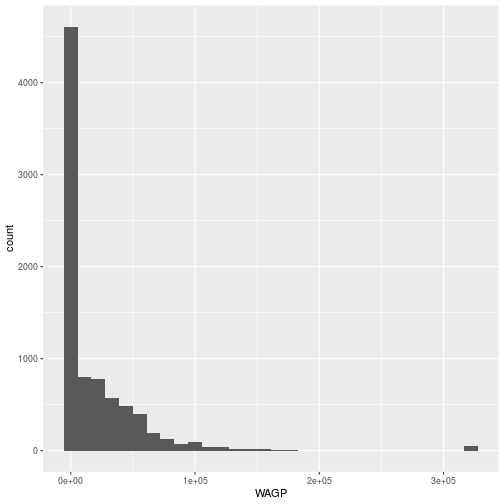
The ggplot command expects a data frame and an aesthetic mapping. The aes
function creates the aesthetic, a mapping between variables in the data frame
and visual elements in the plot. Here, the aesthetic maps WAGP to the
x-axis; a histogram only needs one variable mapped.
The ggplot function by itself only creates the axes, because only the
aesthetic map has been defined. No data are plotted until the addition of a
geom_* layer, in this example a geom_histogram. Layers are literally added,
with +, to the object created by the ggplot function.
Plotting histograms is always a good idea when exploring data. The zeros and the “top coded” value used for high wage-earners in PUMS are outliers.
library(dplyr)
person <- filter(
  person,
  WAGP > 0,
  WAGP < max(WAGP, na.rm = TRUE))
The dplyr package provides tools for manipulating tabular data. It is an essential accompaniment to ggplot2.
The geom_histogram aesthetic only involves one variable. A scatterplot
requires two, both an x and a y.
ggplot(person,
  aes(x = AGEP, y = WAGP)) +
  geom_point()
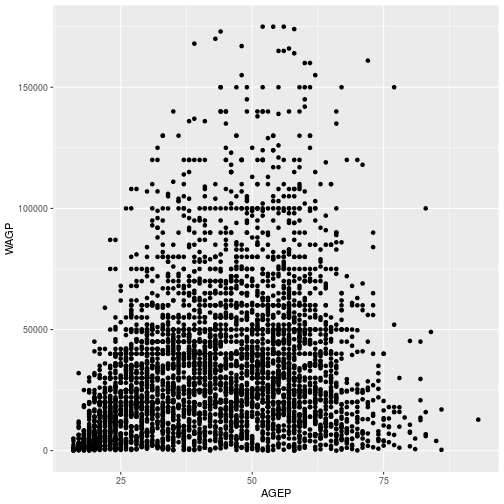
The aes function can map variable to more than just the x and y axes in a
plot. There are several other “scales” that exist, although whether and how they
show up depends on the geom_* layer. Commonly used arguments are color for
line or edge color and fill for interior colors, but many more are
available.
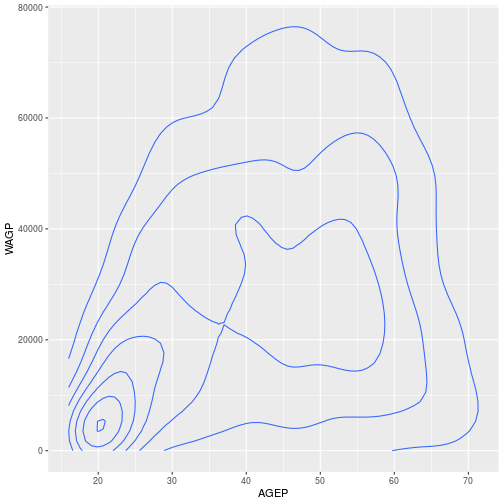
The aesthetic and the geometry are entirely independent, making it easy to
experiment with very different kinds of visual representations. The only change
needed is in the geom_* layer.
ggplot(person,
  aes(x = AGEP, y = WAGP)) +
  geom_density_2d()
For a discrete x-axis, a boxplot is often beter than a scatterplot.
ggplot(person,
  aes(x = SCHL, y = WAGP)) +
  geom_boxplot()
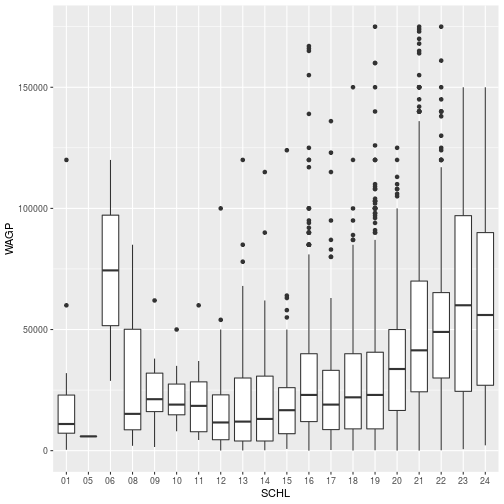
To create a scatterplot, a boxplot, and even a 2d kernel density estimate, the
geom_* function takes no arguments. Every layer added on top of the foundation
generated by the call to ggplot inherits the dataset and aesthetics of the
foundation.
- Question
- What happens if you supply
x = AGEPto the aesthetic map in the boxplot? - Answer
- Boxplots aren’t designed for continuous x-axis variables, so the result is not useful. Fortunately, there’s a warning.
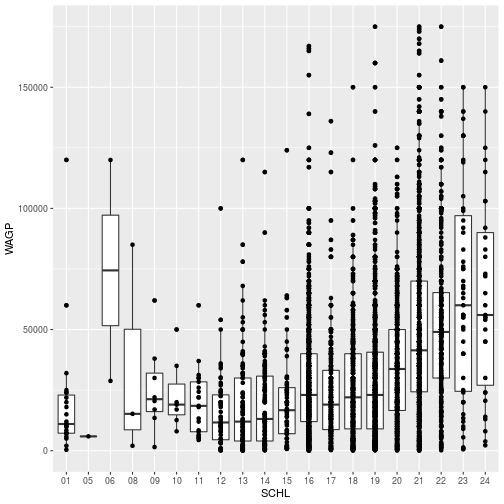
Multiple geom_* layers create a plot with multiple visual elements.
ggplot(person,
  aes(x = SCHL, y = WAGP)) +
  geom_boxplot() +
  geom_point()
Layer Customization
Each geom_* object accepts arguments to customize that layer. Many arguments
are common to multiple geom_* functions, such as changing the layer’s color.
ggplot(person,
  aes(x = SCHL, y = WAGP)) +
  geom_point(color = 'red') +
  geom_boxplot()
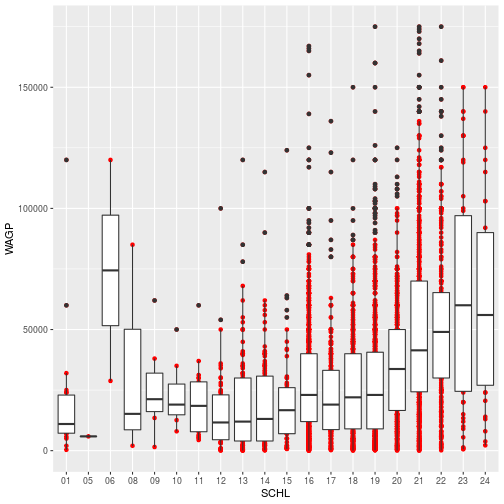
The color specification was not part of aesthetic mapping between data and
visual elements, so 1) it applies to every record (or person) and 2) only the
elements in the scatterplot layer are affected.
The stat parameter, in conjunction with fun.y, provides the ability to
perform on-the-fly data transformations.
ggplot(person,
  aes(x = SCHL, y = WAGP)) +
  geom_boxplot() +
  geom_point(
    color = 'red',
    stat = 'summary',
    fun.y = mean)
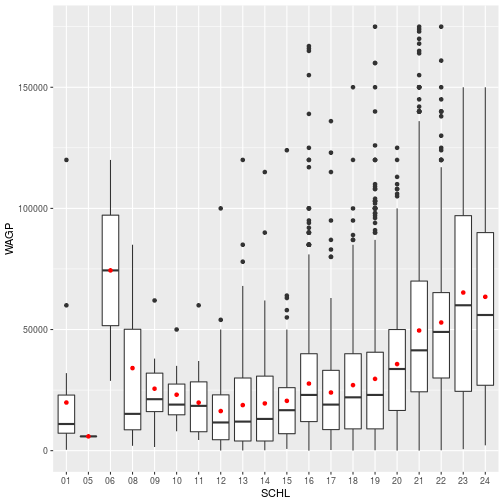
With stat = 'summary', the plot replaces the raw data with the result of a
summary function applied to whatever “grouping” is defined in the aesthetic. In
this case, it’s the ordinal x-axis that defines education attainment groups. The
fun.y argument determines what function, here the function mean, with which
you want to summarize each group.
Additional Aesthetics
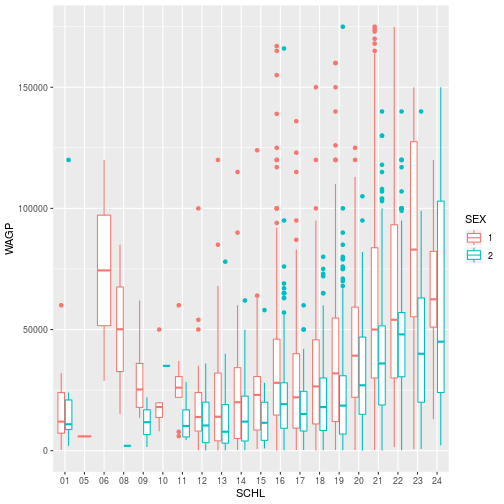
The true power of ggplot2 is the natural connection it provides between variables and visuals.
Associating color (or any attribute, like the shape of points) to a variable is
another kind of aesthetic mapping. Passing the color argument to the aes
function works quite differently than assiging color to a geom_*.
ggplot(person,
  aes(x = SCHL, y = WAGP, color = SEX)) +
  geom_boxplot()
- Question
- What sex do you think is coded as “1”?
- Answer
- … Megan is skeptical about the answer!

Properties of the data itself are similarly independent of the aesthetic mapping and the visual elements, while still affecting the output.
person$SEX <- factor(person$SEX, levels = c("2", "1"))

ggplot(person,
  aes(x = SCHL, y = WAGP, color = SEX)) +
  geom_boxplot()
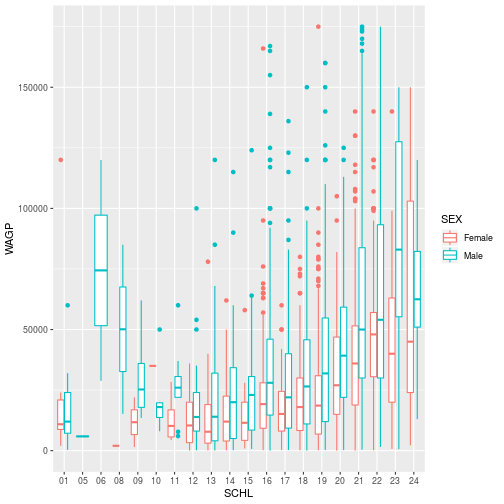
There can be cases where you don’t want to or can’t modify the dataframe. Then, it is still possible to change properties of the data to get the plot you’d like within the ggplot, aes, and scale_* functions. More on modifying plots with scale_* later in the lesson.
Storing and Re-plotting
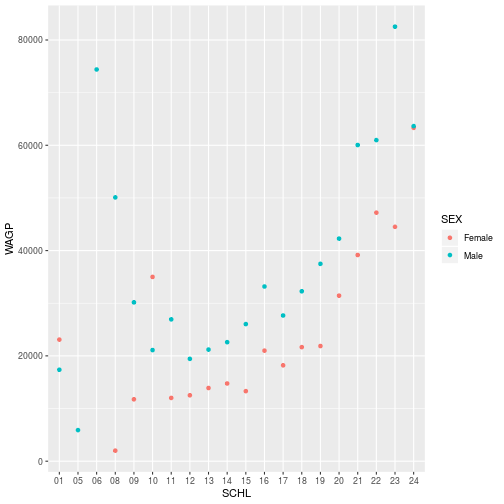
The output of ggplot can be assigned to a variable, which works with + to
add layers.
schl_wagp <- ggplot(person,
  aes(x = SCHL, y = WAGP, color = SEX)) +
  geom_point(
    stat = 'summary',
    fun.y = 'mean')
The plot information stored in schl_wagp can be used on its own, or with
additional layers.
> schl_wagp
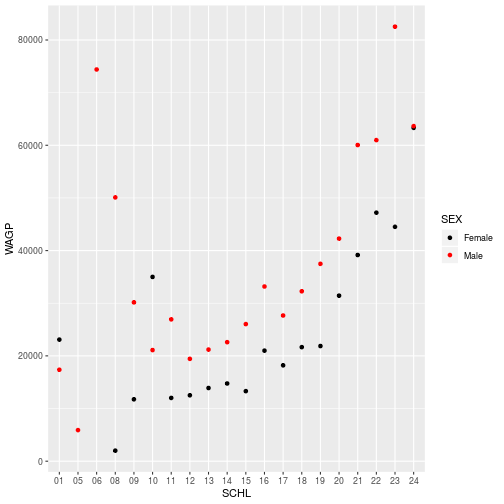
Store additional layers by overwriting the variable (or creating a new one).
schl_wagp <- schl_wagp +
  scale_color_manual(
    values = c('black', 'red'))
> schl_wagp
Figures are constructed in ggplot2 as layers of shapes, from the
axes on up through the geom_* elements. The natural file type for storing such
figures at “infinite” resolution are PDF (for print) or SVG (for online).
ggsave(filename = 'schl_wagp.pdf',
  plot = schl_wagp,
  width = 4, height = 3)
The plot argument is unnecessary if the target is the most recently displayed
plot, but a little verbosity is not out-of-place here. When a raster file type
is necessary (e.g. a PNG, JPG, or TIFF) use the dpi argument to specify an
image resolution.
Smooth Lines
The geom_smooth layer used above can add various kinds of regression lines and
confidence intervals. A method = 'lm' argument specifies a linear model.
Note, however, that with a categorical predictor mapped to an aesthetic element,
the geom_smooth call would separately perform a linear regression (ANOVA)
within each group. The call to aes must override the “group” aesthetic so the
regression is run once.
ggplot(person,
  aes(x = SEX, y = WAGP)) +
  geom_point() +
  geom_smooth(
    method = 'lm',
    aes(group = 0))
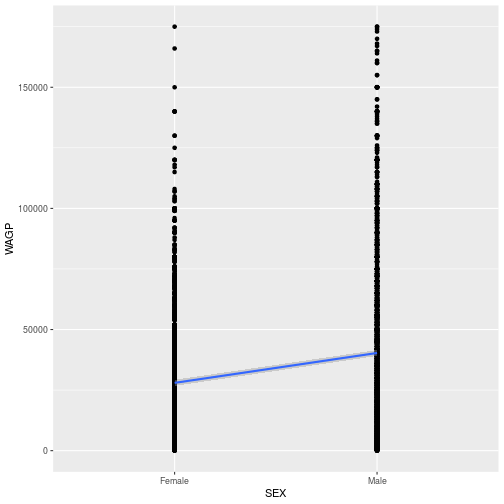
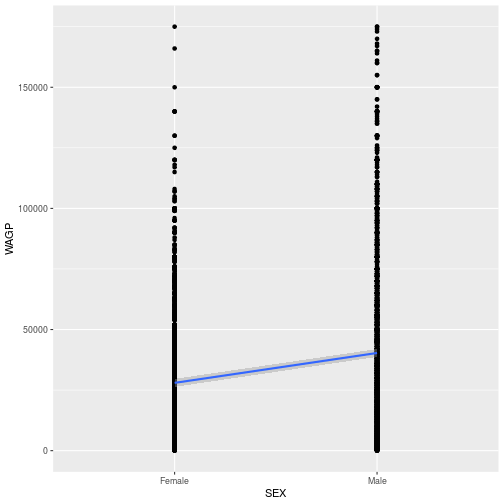
Is there really a confidence interval? Yes, it’s just pretty narrow and hard to
see. You could add a size = 0.5 argument to geom_smooth to see there is a
gray interval around the line. Or, as the next step shows, you could change
the size of the confidence interval for a better visual representation of the
variability.
The level argument for geom_smooth controls the limits of the confidence
interval, defaulting to 95%.
ggplot(person,
  aes(x = SEX, y = WAGP)) +
  geom_point() +
  geom_smooth(
    method = 'lm',
    level = 0.99,
    aes(group = 0))
Axes, Labels and Themes
The aes and the geom_* functions do their best with annotations and styling,
but precise control comes from labs, scale_*, and theme_*.
First, store a plot to simplify experiments with the labels.
sex_wagp <- ggplot(person,
  aes(x = SEX, y = WAGP)) +
  geom_point() +
  geom_smooth(
    method = 'lm',
    aes(group = 0))
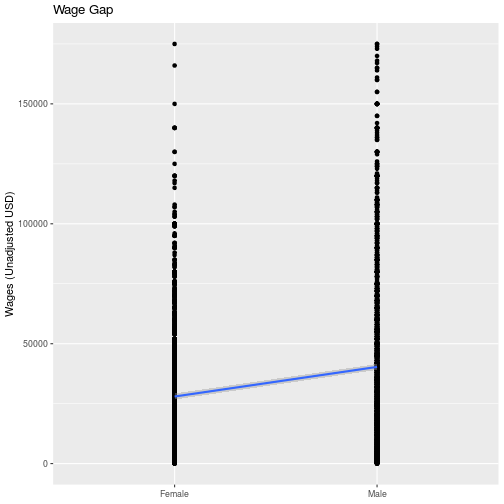
Set the title and axis labels with the labs function, which accepts names for
labeled elements in your plot (e.g. x, y, title) as arguments.
sex_wagp + labs(
  title = 'Wage Gap',
  x = NULL,
  y = 'Wages (Unadjusted USD)')
For information on how to add special symbols and formatting to plot labels, see
?plotmath.
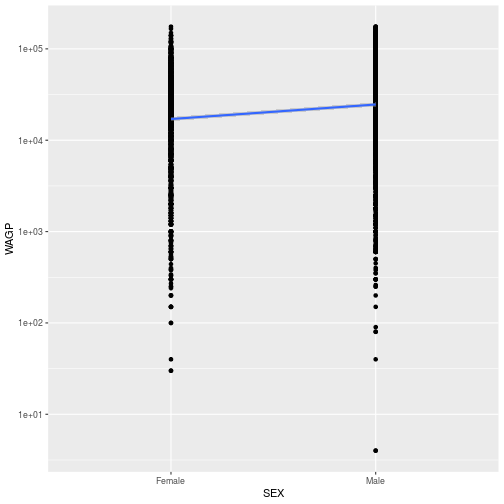
Functions related to the axes, i.e. their limits, breaks, and any transformation
are all scale_* functions. To modify any property of a continuous y-axis, add
a call to scale_y_continuous.
sex_wagp + scale_y_continuous(
  trans = 'log10')
“Look and feel” options in ggplot2, from background color to font
sizes, can be set with theme_* functions.
sex_wagp + theme_bw()
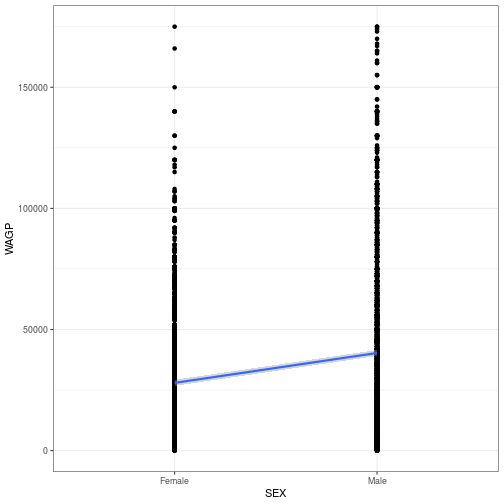
Start typing theme_ on the console to see what themes are available in the
pop-up menu. The default theme is theme_grey. A popular “minimal” theme is
theme_bw. Any option set by a theme_* function can also be set by calling
theme itself with the option and value as an argument.
The options available directly through theme offer limitless possibilities
for customization.
Do be aware that if theme comes after other custom specifications, it will overwrite
those customizations. Check the order if your plot isn’t looking how you’d like it to look.
sex_wagp + theme_bw() +
  labs(title = 'Wage Gap') +
  theme(
    plot.title = element_text(
      face = 'bold',
      hjust = 0.5))
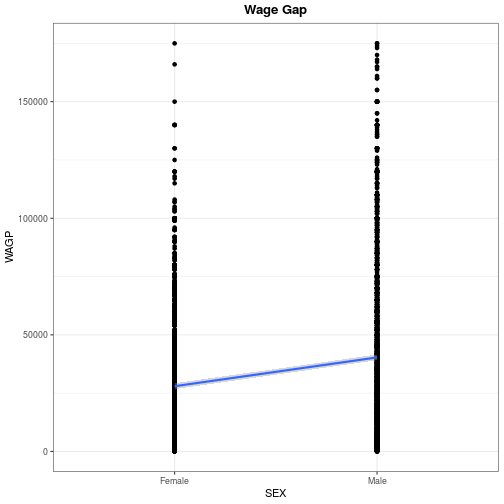
Use ?theme for a list of available theme options. Note that position (both
legend.position and hjust for horizontal justification) should be given as a
proportion of the plot window (i.e. between 0 and 1).
Facets
To conclude this overview of ggplot2, we’ll apply the same plotting instructions to different subsets of the data, creating panels or “facets”.
The facet_wrap function takes a vars argument that, like the aes function,
relates a variable in the dataset to a visual element, the panels. The
facet_grid function works like facet_wrap, but expects two variables to
facet by the interaction of a row variable by a column variable.
The gender wage gap apparent in the US Census PUMS data is probably not consistent across people who obtained different levels of education.
person$SCHL <- factor(person$SCHL)
levels(person$SCHL) <- list(
  'High School' = '16',
  'Bachelor\'s' = '21',
  'Master\'s' = '22',
  'Doctorate' = '24')
The technical documenation for the PUMS data includes a data dictionary, explaining the codes used for education attainment, and everything else you’ld like to know about the dataset.
The sex_wagp plot created above stored it’s own copy of the data, so create a
new ggplot foundation using a cleaned up dataset.
ggplot(na.omit(person),
  aes(x = SEX, y = WAGP)) +
  geom_point() +
  geom_smooth(
    method = 'lm',
    aes(group = 0)) +
  facet_wrap(vars(SCHL))
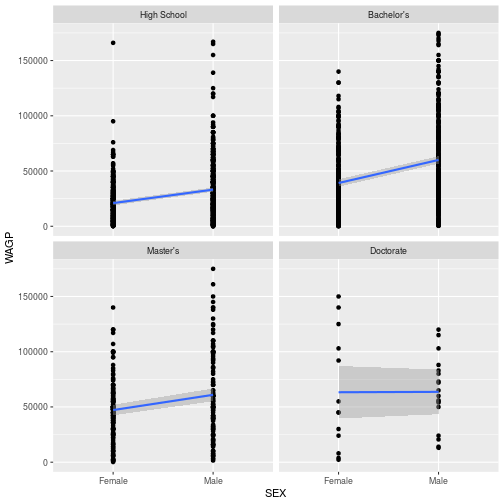
- Question
- What wage gap trend do you think is worth investigating, and how might you do it?
- Answer
- There are so many possibilities! For example, a scatterplot of wage against age colored by sex that includes a fitted regression model.
Review
- Call
ggplotwith data and anaesto pave the way for subsequent layers. - Add one or more
geom_*layers, possibly with data transformations. - Add
labsto annotate your plot and axes labels (not optional!). - Optionally add
scale_*,theme_*,facet_*, or other modifiers that work on underlying layers.
Additional Resources
- Data Visualization with ggplot2 RStudio Cheat Sheet
- Cookbook for R - Graphs Reference on customizations in ggplot
- Introduction to cowplot Vignette for a package with ggplot enhancements
Exercises
Exercise 1
Use ggplot to show how the mean wage earned in the U.S. varies with age,
showing males and females in different colors. (Hint: Baby steps! Start with a
scatterplot of wage by age. Then expand your code to plot only the means. Then
distinguish sexes by color.)
Exercise 2
Create a histogram, using a geom_histogram layer, of the wages earned by
females and males, with sex distinguished by the color of the bar’s interior. To
silence that warning you’re getting, open the help with ?geom_histogram and
determine how to explicitly set the bin width.
Exercise 3
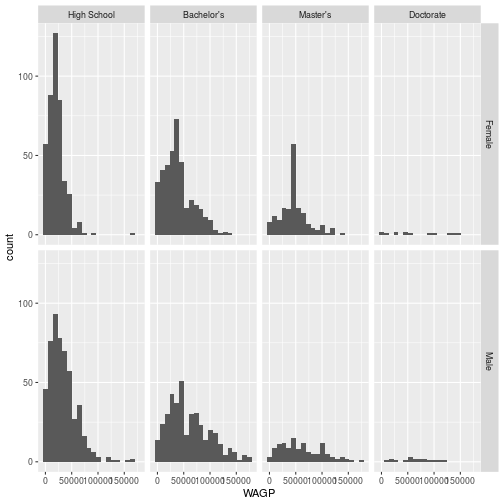
The facet_grid layer (different from facet_wrap) requires an argument for
both row and column varaibles, creating a grid of panels. Create a plot with 8
facets, each displaying a single histogram of wage earned by women or men having
one of the four education attainment levels. Make the grid have 2 rows and 4
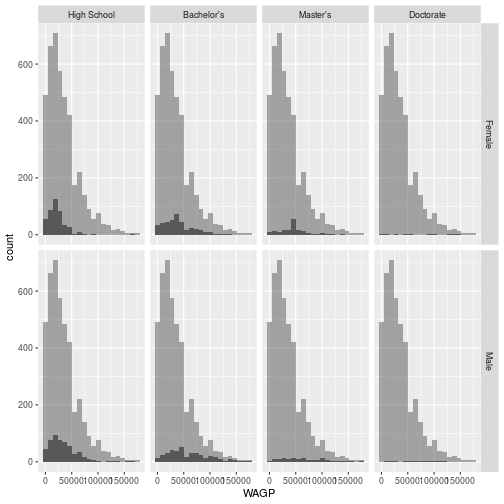
columns. Advanced challenge: add a second, partially transparent, histogram to
the background of each facet that provides a comparison to the whole population.
(Hint: the second histogram should not inherit the dataset from the ggplot
foundation.)
Solutions
ggplot(person,
  aes(x = AGEP, y = WAGP, color = SEX)) +
  geom_line(stat = 'summary',
            fun.y = 'mean')
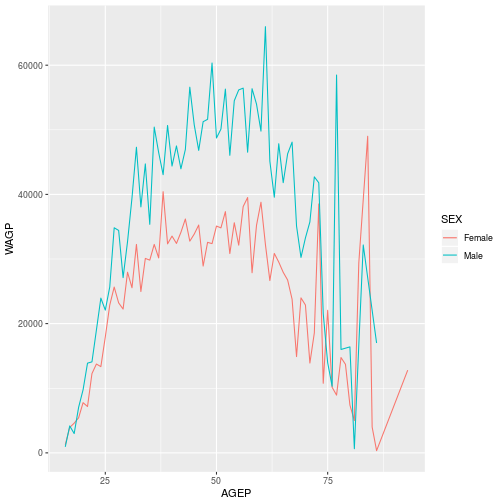
ggplot(person,
  aes(x = WAGP, fill = SEX)) +
  geom_histogram(binwidth = 10000)
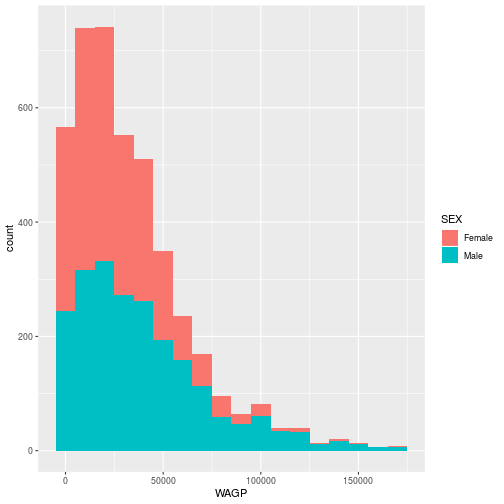
ggplot(na.omit(person),
  aes(x = WAGP)) +
  geom_histogram(bins = 20) +
  facet_grid(vars(SEX), vars(SCHL))
For the advanced challenge, you must supply a dataset to a second gemo_histogram
that does not have the variable specified in facet_grid. Note that
facet_grid affects the entire plot, including layers added “after faceting”,
as in the solution below.
ggplot(na.omit(person),
  aes(x = WAGP)) +
  geom_histogram(bins = 20) +
  facet_grid(vars(SEX), vars(SCHL)) +
  geom_histogram(
    bins = 20,
    data = na.omit(person['WAGP']),
    alpha = 0.5)
If you need to catch-up before a section of code will work, just squish it's 🍅 to copy code above it into your clipboard. Then paste into your interpreter's console, run, and you'll be ready to start in on that section. Code copied by both 🍅 and 📋 will also appear below, where you can edit first, and then copy, paste, and run again.
# Nothing here yet!